Entity Classes
Entity classes are a core component of AlyxLib, which simplifies the process of creating and managing entities with shared behavior. Entity classes allow you to define a set of properties and functions that can be shared across multiple entities, making it easier to create complex behaviors and interactions between entities.
Overview of features:
- Automatic variable saving/loading
- Multiple inheritance
- Easy hooks for outputs and events
Basic declaration
An entity class is declared using the entity() function.
If entity() is called in a script attached to an entity, the entity will automatically inherit the class and any subsequent entities using the script will inherit the already created class without recreating it each time.
To manually inherit a class at any point you can use the inherit() function.
-- Force the entity running this script to inherit MyClass.
inherit("MyClass")

-- Or specify an entity to inherit MyClass.
inherit("MyClass", entity)
Note
Currently there is no built-in way to manually inherit a class and preserve the inheritance between game loads.
The recommended approach is to attach the script directly to the entity.
Persistent inheritance support is planned for a future update.
Basic template
Tip
If you've installed the VSCode snippets file for AlyxLib, you can use the Class Script snippet to create a basic class template.
if thisEntity then
    -- Inherit this script if it's directly attached to an entity
    -- Will also load the script at the same time if needed
    inherit(GetScriptFile()) -- (1)!
    return
end

---@class ClassName : EntityClass
local base = entity("ClassName")

---Called automatically on spawn.
---@param spawnkeys CScriptKeyValues
function base:OnSpawn(spawnkeys)
end

---Called automatically after OnActivate, when EasyConvars and Player have initialized.
---@param readyType OnReadyType
function base:OnReady(readyType)
end

---Main entity think function. Think state is saved between loads.
function base:Think()
    return 0
end

---The script returns the class table so it can be inherited directly.
return base
- It's now recommended to use the class explicitly, e.g.
For a full list of built-in EntityClass methods see the class reference
You can attach your class script to an entity like normal using Misc -> Entity Scripts: my_addon/classes/dog
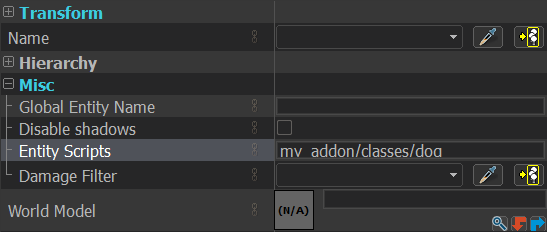
Class scripts can technically be anywhere in the vscripts folder, but to avoid naming conflicts and to keep things clean it's recommended to place them all in a classes subfolder of your addon script folder.
scripts
vscripts
my_addon
classes
animal.lua
cat.lua
dog.lua
Methods
Methods are simply functions that belong to the class.
function base:AddHealth(n)
    self:SetHealth(self:GetHealth() + n) -- (1)!
end

function base:MultiplyHealth(n)
    self:SetHealth(self:GetHealth() * n)
end
- Remember to use
selfin the method to reference the entity rather than the class.thisEntitydoes not exist in class scripts.
Methods can be called via Hammer I/O simply using the CallScriptFunction input. The activator and caller will be passed into the first parameter as a table.
---@param params IOParams
function base:TouchedByItem(params)
    if IsValidEntity(params.activator) then -- (1)!
        if params.activator:GetName() == "multi_healer" then
            self:MultiplyHealth(2)
        else
            self:AddHealth(20)
        end
    end
end
- There are some rare cases where
activatororcallermight not be a valid entity, so it's good practice to check first.

Properties
Properties are class values which are automatically saved and inherited.
Note
Properties are only saved when the value is directly changed. If the property stores a table and a key is changed, the table will not automatically save because the reference is unchanged. You can use self:Save() to force a full or specific save.
Properties should be declared in the class definition.
---@class Animal : EntityClass
local base = entity("Animal")

---Declare a class property.
base.legs = 4 -- (1)!
- Note the use of
basehere to declare it directly on the class.
When getting/setting the property value, self should be used to make sure the instance value is accessed instead of the initial base class.
Properties with a double underscore prefix '__' will not automatically save. This is useful for large table/data values that don't need persistence but still need to be part of the class. This also keeps the entity's context cleaner, as tables especially take up a lot of room.
Inheritance
Inheritance is a key concept in object-oriented programming which Entity Classes attempt to replicate in Lua. It allows you to create classes which "inherit" the behavior of one or more parent classes. This is useful for creating a hierarchy of related classes which share common methods and properties.
---@class Animal : EntityClass (1)
local base = entity("Animal")

function base:Speak()
    print("Animal noise")
end
- Lua Language Server needs to be told we are inheriting
EntityClasseven though it is inherited automatically in theentityfunction.
---@class Dog : Animal (1)
local base = entity("Dog", "Animal") -- (2)!

---Override the base method with new functionality.
function base:Speak()
    print("Woof!")
end
- Animal already inherits
EntityClass, so by inheritingAnimalwe also inheritEntityClassand get correct code completion. - The inheritance parameter can be the string name, a direct class table reference, or the path to the class script as long as the script returns the class table reference.
Entity classes in AlyxLib support "multiple inheritance" making it easier to create a flexible class hierarchy and to share code between classes.
Multiple inheritance lets you create entities that combine behaviors from different sources. For instance, a Dog might provide basic animal behavior, while a CombatReady class adds attack logic. By inheriting from both, we can define an AttackDog that barks and bites.
---@class CombatReady : EntityClass
local base = entity("CombatReady")
CombatReady = base -- (1)!

base.damage = 10
base.damageAttachment = "weapon"

---@param enemy EntityHandle
function base:Attack(enemy)
    local dmg = CreateDamageInfo(self, self,
        self:GetForwardVector() * self.damage,
        self:GetAttachmentNameOrigin(self.damageAttachment),
        self.damage,
        DMG_SLASH
    )

    enemy:TakeDamage(dmg)

    DestroyDamageInfo(dmg)
end
- Storing the class table in a global variable allows us to easily access it in other scripts.
---@class AttackDog : Dog, CombatReady
local base = entity("AttackDog", "Dog", "CombatReady")

base.damage = 20
base.damageAttachment = "mouth"

---Override method to speak while calling base attack method
function base:Attack(enemy)
    CombatReady.Attack(self, enemy) -- (1)!
    self:Speak()
end
- There is no built in "super" functionality yet, but it's on the way.
Tip
When a class inherits from multiple parents, members are resolved in the order they’re listed.
If both Dog and CombatReady define the same method or property, the version from Dog will be used because it appears first in the inheritance list.
Because entity classes restructure an entity’s metatable, you can override built-in methods without affecting other entities.
This makes it possible to customize native behavior in a class-specific way, without requiring other code to be aware of your class’s internal structure.
---Notify console when this entity is moved.
---@param origin Vector
function base:SetOrigin(origin)
    CBaseEntity.SetOrigin(self, origin) -- (1)!
    print("Setting origin for " .. Debug.EntStr(self))
end
- When calling a method from a base entity, use dot notation (
.) instead of colon notation (:) so you can explicitly pass the instance as the first argument.
Thinking
Starting and maintaining a think function is abstracted into a single Think that you can define in your class, with easy functions to pause and resume. The current state of the think is also saved between game loads so you don't have to worry about restarting it.
---@class ThinkExample : EntityClass
local base = entity("ThinkExample")

base.lastPrintedSecond = -1
base.elapsedTime = 0

---Start thinking only on first spawn
---@param spawnkeys CScriptKeyValues
function base:OnSpawn(spawnkeys)
    print("Save and load within 20 seconds to see think state persistence")
    self:ResumeThink()
end

function base:Think()
    self.elapsedTime = self.elapsedTime + FrameTime()
    local seconds = math.floor(self.elapsedTime)

    if seconds % 2 == 0 and seconds ~= self.lastPrintedSecond then
        print("Server time is even: " .. seconds)
        self.lastPrintedSecond = seconds
    end

    if seconds > 20 then
        print("Stopping Think after 20 seconds")
        return self:PauseThink() -- (1)!
    end

    return 0 -- (2)!
end
PauseThink()returnsnil, and yourThinkfunction must also returnnilto stop further processing.- Returning
0from theThinkfunction schedules it to run again immediately with no delay.
Events
Game/Player events and entity outputs can be defined in a class using the built-in entity class methods.
---Update this ResinDisplay whenever a player puts resin in their backpack.
---@param params GameEventPlayerDropResinInBackpack
base:GameEvent("player_drop_resin_in_backpack", function(self, params) -- (1)!
    ---@cast self ResinDisplay (2)
    self:UpdateDisplay(Player:GetResin())
end)
selfmust be declared explicitly because this is an anonymous function, not a method defined with colon (:) syntax.- Unfortunately due to Lua Language Server limitations, we must explicitly cast
selfto the correct type within the function.
---@param params PlayerEventItemPickup
base:PlayerEvent("item_pickup", function(self, params)
    ---@cast self SpecialDevice
    if params.item == self then
        self:ResumeThink()
    end
end)

---@param params PlayerEventItemReleased
base:PlayerEvent("item_released", function(self, params)
    ---@cast self SpecialDevice
    if params.item == self then
        self:PauseThink()
    end
end)
Tip
In some cases it might be more performant to register one game event in a global script instead of for each entity, especially if you have many entities using the class.
---Update all ResinDisplays whenever a player puts resin in their backpack.
---@param params GameEventPlayerDropResinInBackpack
ListenToGameEvent("player_drop_resin_in_backpack", function(params)
    local resin = Player:GetResin()
    for _, display in ipairs(GetAllDisplays()) do -- (1)!
        display:UpdateDisplay(resin)
    end
end, nil)
GetAllDisplays()would be a global function you create, returning all existingResinDisplayentities.
Hooks
Entity classes support all standard entity hooks, plus an extra OnReady hook to run code when AlyxLib systems are ready.
---"Activate" hook.
---@param activateType ActivationType
function base:OnActivate(activateType)
end

---"OnBreak" hook.
---@param inflictor EntityHandle
function base:OnBreak(inflictor)
end

---"OnTakeDamage" hook.
---@param damageTable OnTakeDamageTable
function base:OnTakeDamage(damageTable)
end

---"Precache" hook.
---@param context CScriptPrecacheContext
function base:Precache(context)
end

---"Spawn" hook.
---@param spawnkeys CScriptKeyValues
function base:OnSpawn(spawnkeys)
end

---"UpdateOnRemove" hook.
function base:UpdateOnRemove()
end

---Fired by the "Activate" hook after time has passed for AlyxLib systems to set up.
---@param readyType OnReadyType
function base:OnReady(readyType)
end
Real examples
This is a list of links to entity classes being used in released addons.
- Resin Watch (Item Tracker) https://github.com/FrostSource/resin_watch/blob/main/scripts/vscripts/resin_watch/classes/watch.lua
- Removable Health Vials https://github.com/FrostSource/removable_health_vials/blob/main/scripts/vscripts/removable_health_vials/health_station.lua
- Alyx Wears Glasses https://github.com/FrostSource/alyx_optometry/blob/main/scripts/vscripts/alyx_optometry/classes/glasses.lua
- PortalsInHLA https://github.com/FrostSource/PortalsInHLA/tree/overhaul/scripts/vscripts/portal/classes
Reference
View the full reference here.